e-Doręczenia for Business in Poland: Who Needs an Electronic Address and How to Set It Up

Since 1 January 2026, e-Doręczenia has become the main method for electronically delivering official correspondence between public authorities and non-public entities, including companies and entrepreneurs.
The system is primarily used when legally valid proof of sending or receiving a document is required. Special regulations and individual electronic services may provide for other methods of communication.
For most companies, the obligation to use e-Doręczenia is already in force. The next important deadline applies to sole traders registered in CEIDG before the end of 2024: they must have an active address from 1 October 2026.
Below, we explain how the system works, who is required to register, and how to organise official correspondence within a business.

What is e-Doręczenia?
e-Doręczenia is the electronic equivalent of a registered letter with proof of delivery. The system can be used to submit applications, receive decisions from public authorities, and retain official proof that documents have been sent and delivered.
An e-Doręczenia address cannot be replaced with a standard company email address. It is a unique technical address registered in the official Electronic Address Database — Baza Adresów Elektronicznych, or BAE.
It may look like this:
AE:PL-12345-67890-ABCDE-12
The address makes it possible to identify the sender and recipient and confirm the date and time when correspondence was transmitted.
Personal and business correspondence use separate addresses. Therefore, even if someone already has a personal e-Doręczenia inbox, they must create a separate business address for their activity registered in CEIDG.
ePUAP has not disappeared completely. However, since 1 January 2026, e-Doręczenia has been the main channel for official electronic correspondence. Other communication methods may still be used where special regulations or a specific electronic service allow them.
Who must have an e-Doręczenia address?
The registration deadline depends on the register in which the business is entered and the date of registration.
Sole traders registered in CEIDG before the end of 2024 must therefore activate their address no later than 30 September 2026.
However, it is not always possible to wait until that date. If an entrepreneur changes their CEIDG details after 30 June 2025, the information required to create an e-Doręczenia address becomes a mandatory part of the application.
This may apply, for example, when:
- changing the business address;
- suspending or resuming business activity;
- changing PKD activity codes;
- adding or changing an authorised representative;
- making other updates to the CEIDG entry.
Why the inbox must be checked regularly
The e-Doręczenia system applies the principle of deemed delivery — fikcja doręczenia.
If correspondence from a public authority is delivered to the inbox of a company or entrepreneur but is not received earlier, it is considered legally delivered on the day following the end of the 14-day period calculated from the date of receipt indicated in the delivery confirmation.
That date is treated as the official date of service. Deadlines for responding, submitting documents, or filing an appeal are calculated according to the rules applicable to the relevant procedure.
As a rule, the absence of an email notification, the owner’s holiday, or irregular inbox checks do not suspend statutory deadlines.
What may happen if the inbox is not created or checked
The e-Doręczenia Act does not impose a separate automatic fine solely for failing to have an address. The main risk is missing legally significant correspondence and the deadlines connected with it.
If the recipient does not have an active e-Doręczenia address, a public authority may, where permitted by law, use the Public Hybrid Service — Publiczna Usługa Hybrydowa, or PUH.
The document is transferred electronically to the operator, printed, and delivered to the recipient in paper form.
Once the address has been activated, it is particularly important to monitor incoming messages regularly. Missing a deadline may mean that the entrepreneur does not have enough time to submit documents, respond to a request, or appeal a decision.
In tax proceedings, an authority may impose a kara porządkowa, or procedural fine, in the circumstances listed in Article 262 of the Polish Tax Ordinance. In 2026, the maximum amount is PLN 3,800.
This is not a fine for simply having or not having an e-Doręczenia inbox. It may be imposed for a specific procedural violation, such as failing to comply with a properly delivered request where tax law allows such a penalty.
How to create an e-Doręczenia address for a sole trader
For a sole trader registered in CEIDG, creating an e-Doręczenia address usually takes little time. Most information is retrieved automatically, and the application can be signed using Profil Zaufany.
The process is similar to creating a personal e-Doręczenia inbox. However, the applicant must select registration of an address specifically for business activity.
Important: a personal e-Doręczenia address and a sole trader’s business address are two separate addresses. Official correspondence relating to an activity registered in CEIDG requires a separate business address.
What to prepare before you start
You will need:
- Profil Zaufany, e-dowód, or a qualified electronic signature;
- a current email address;
- access to your account on Biznes.gov.pl;
- the administrator’s details if another person will manage the inbox.
A sole trader may manage the inbox personally. An accountant or another user can be added later, after the address has been activated.
Step 1. Open the address creation service
Log in to Konto Przedsiębiorcy on Biznes.gov.pl and open the service for creating an e-Doręczenia address.

On the start screen, click:
Złóż wniosek — Submit an application.

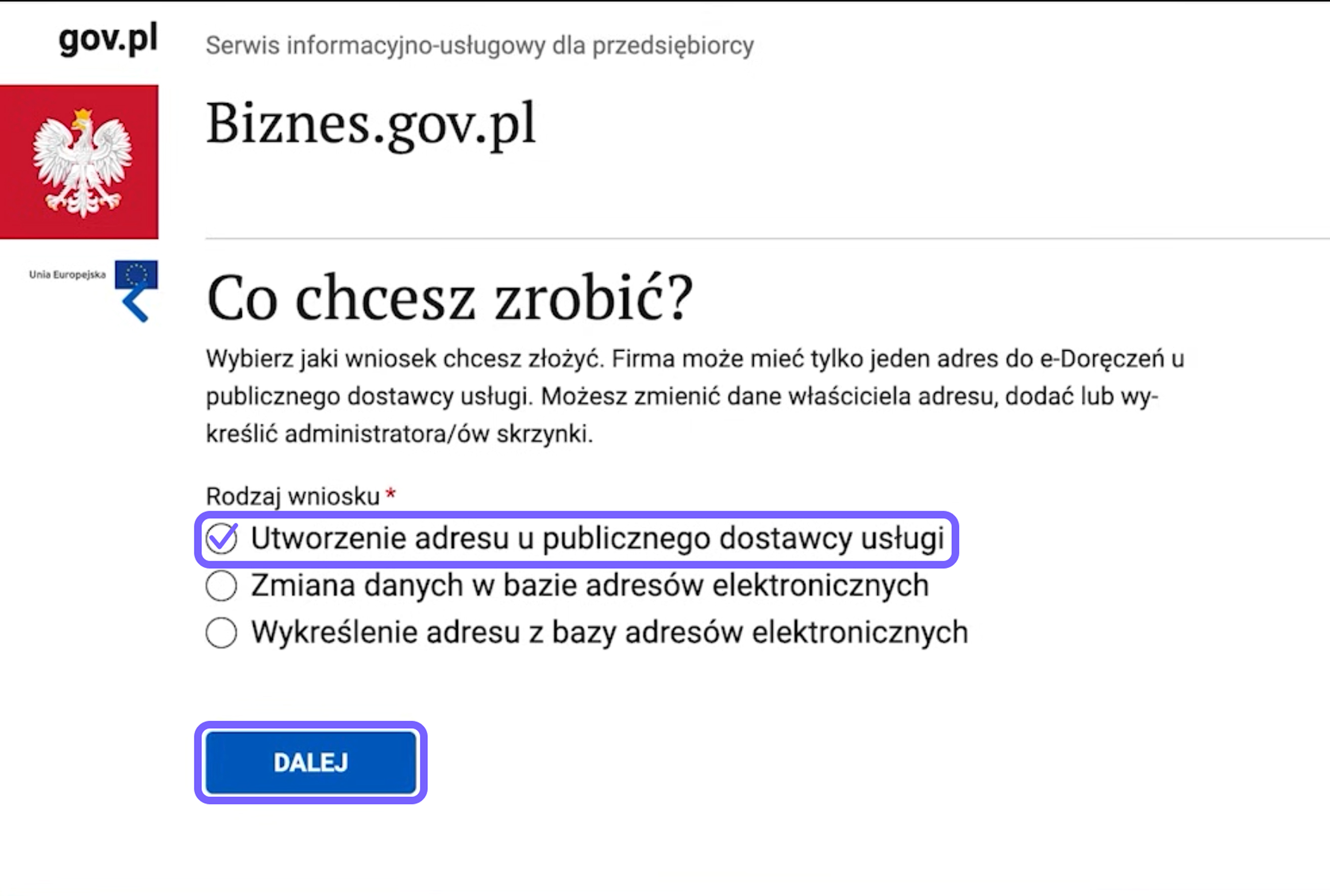
Step 2. Select the public service provider
The system will ask how you want to create the address. Select:
Utworzenie adresu u publicznego dostawcy usługi — Create an address with the public service provider.
This is the free option intended for official correspondence with public authorities.
Click Dalej — Next.
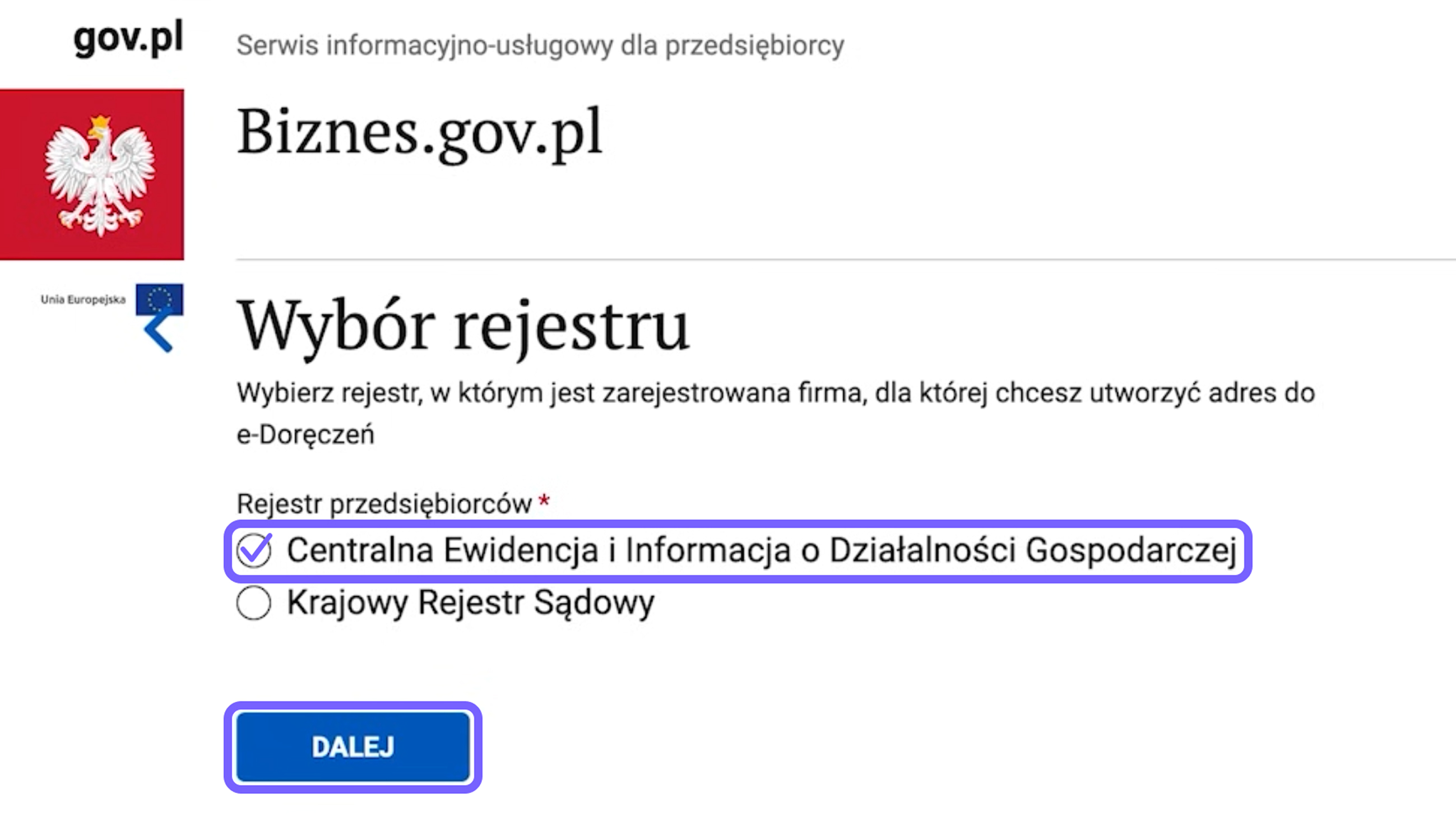
Step 3. Select the business register
On the next screen, select:
Centralna Ewidencja i Informacja o Działalności Gospodarczej — Central Register and Information on Economic Activity, CEIDG.
This option is intended for sole traders operating as a jednoosobowa działalność gospodarcza, or JDG.
Click Dalej — Next.
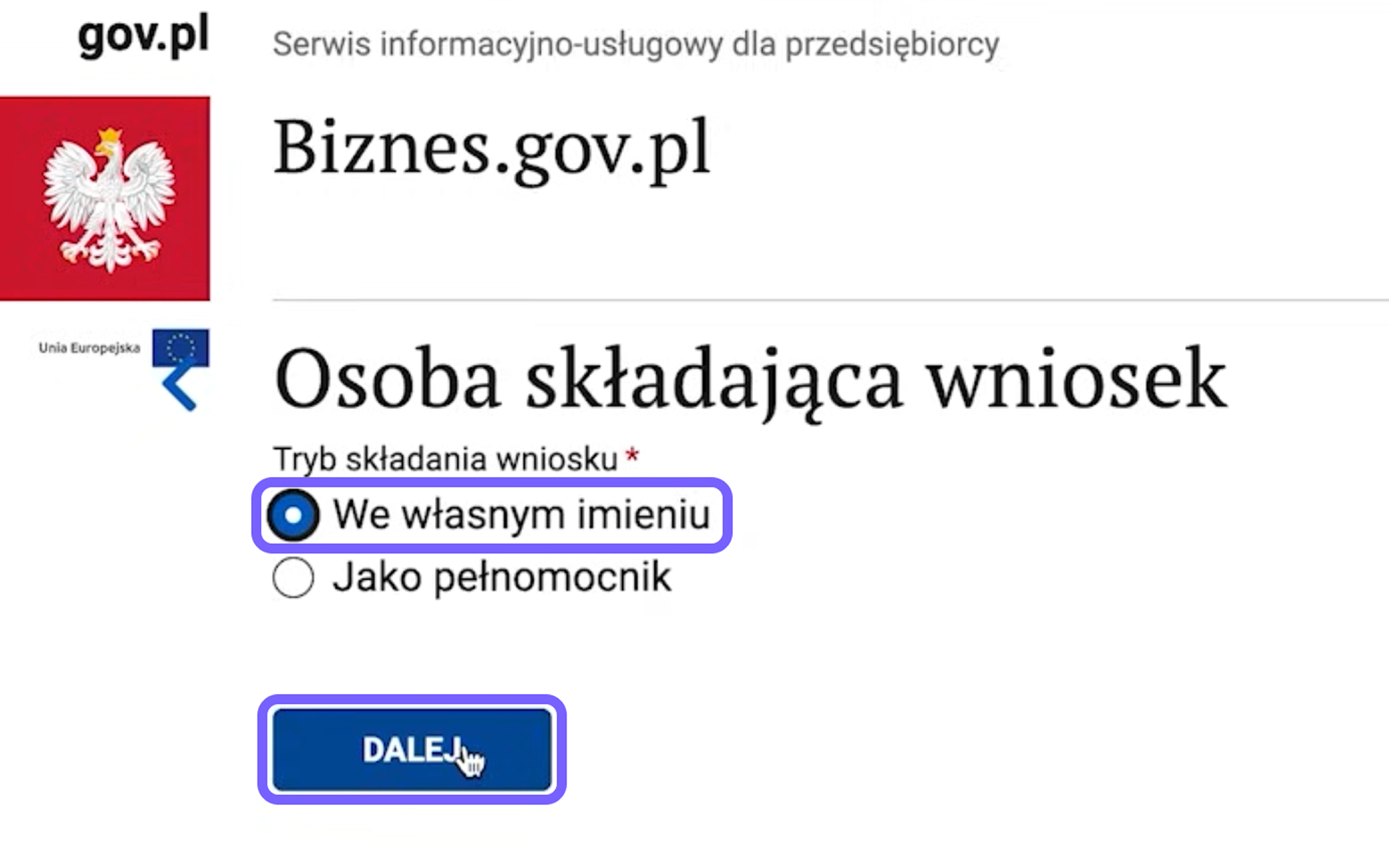
Step 4. Specify on whose behalf the application is being submitted
When creating an address for your own business activity, select:
We własnym imieniu — On my own behalf.
Then click Dalej — Next.
If the application is being submitted by an authorised representative, the process and required documents may be different.
Step 5. Check and complete your details
Some information will be retrieved automatically from CEIDG. Check that the entrepreneur’s details are correct and complete any missing fields.
In particular, verify:
- first name and surname;
- PESEL number;
- NIP and REGON numbers;
- registered business name;
- contact details;
- regular email address.
Technical notifications will be sent to the email address provided, including information about the application status and instructions for activating the inbox.
A regular email address does not replace e-Doręczenia. It is used only for notifications.
After checking the information, click Dalej — Next.
Step 6. Decide whether a separate administrator is needed
The system will ask whether you want to appoint an inbox administrator.
If the entrepreneur intends to manage the inbox personally, they may select the option without appointing a separate administrator.
If another person will manage access and settings, their details must be provided. The administrator may, among other things:
- manage users;
- grant and withdraw access;
- configure permissions;
- work with correspondence within the scope of their permissions.
A separate administrator is not mandatory for a standard JDG. An accountant can be added as a user after the inbox has been activated.
Click Dalej — Next.
Step 7. Accept the terms and conditions
Read the terms governing the service and confirm your acceptance.
Select the relevant box next to Regulamin — Terms and Conditions, then click Dalej — Next.
Step 8. Confirm the declarations
The next screen will display the required declarations — oświadczenia.
Read them and select the necessary boxes to confirm that the information provided is correct.
Then click Dalej — Next.
Step 9. Check the public authority
The system will automatically display the authority responsible for processing the application.
Check the information and click Dalej — Next. In most cases, you do not need to search for or select the authority manually.
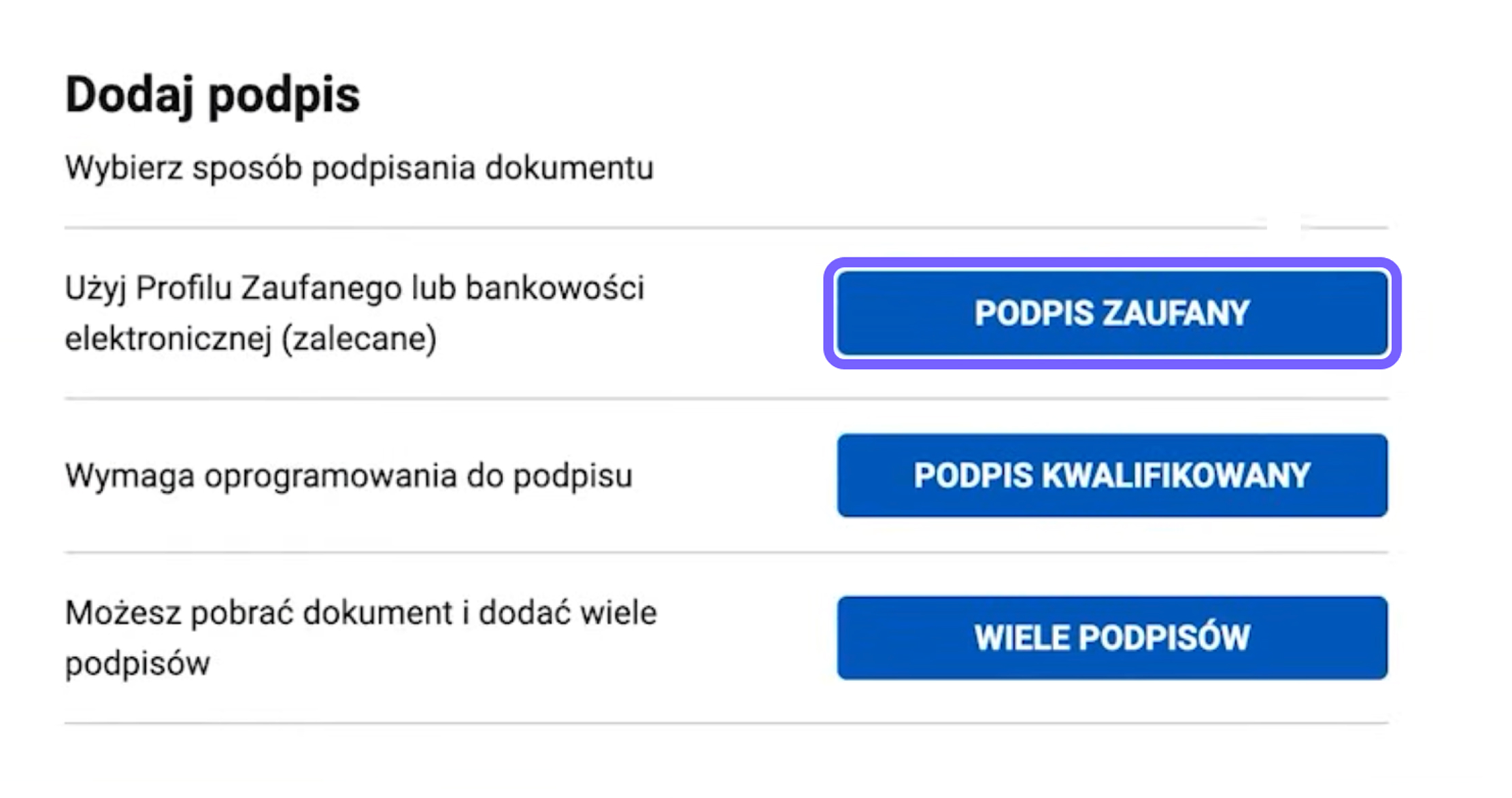
Step 10. Sign the application
After reviewing the application, select your electronic signature method.
When using Profil Zaufany, click:
Podpis zaufany — Trusted signature
and then:
Podpisz podpisem zaufanym — Sign with a trusted signature.
The system will redirect you to the identity confirmation page. Log in and confirm the signature.
After returning to the application, make sure that the signature has been added.
Step 11. Submit the application
After signing, click Wyślij — Send.
A submission confirmation will appear on the screen. The document will also be available in the entrepreneur’s account.
It is advisable to save the confirmation or application reference number until the registration process has been completed.

Step 12. Wait for the instruction email
Once the application has been processed, an email confirming the creation of the e-Doręczenia address will be sent to the address provided earlier.
The email will explain what must be done to activate the inbox.
Important: submitting the application does not mean that the inbox is already active. You must follow the instructions in the email and complete the activation process.
Step 13. Activate the inbox
Follow the instructions in the email or log in again to Konto Przedsiębiorcy on Biznes.gov.pl.
Then:
- open the e-Doręczenia section;
- select the newly created address;
- proceed to activation;
- check the notification email address;
- accept the operator’s terms and conditions if required;
- click Aktywuj skrzynkę — Activate the inbox.
After activation, the address will be entered into the Electronic Address Database, BAE. From that point, public authorities will be able to send official correspondence to it.
What to do after activation
After logging in for the first time, it is advisable to:
- check the notification email address;
- confirm that the inbox status is active;
- arrange regular monitoring of incoming messages;
- give the accountant access if they will handle correspondence;
- appoint an additional administrator if necessary;
- establish a procedure for storing messages and delivery confirmations.
Do not rely only on notifications sent to a regular email account. The responsible person should also log in to the e-Doręczenia inbox regularly.
How to give an accountant access
A business owner or sole trader does not have to process every incoming message personally. Access can be granted to an accountant, lawyer, or another responsible employee.
Only the inbox administrator can add users and manage their permissions.
The system includes several standard roles:
- Właściciel — Owner: the inbox owner;
- Administrator: manages users, roles, and settings;
- Uprawniony — Authorised user: can work with correspondence within the permissions granted;
- Obserwator — Observer: has limited access, for example read-only access.
The administrator can also create additional roles with a selected set of permissions.
To add an accountant, the administrator should:
- log in to the business inbox;
- open the user management section;
- select the option to add a new user;
- enter the user’s details and email address;
- assign the appropriate role;
- send the invitation.
The invitation is valid for 14 days. Once it has been accepted, the user’s status changes to active, and they receive access to the inbox according to the assigned role.
Access is always granted to a specific individual. If an employee leaves the company or cooperation with an accounting firm ends, their permissions must be withdrawn.
Businesses may also appoint several administrators to reduce operational risk. This helps preserve access to inbox management if the main administrator is absent or no longer works with the organisation.
How to organise e-Doręczenia within a business
After activating the inbox, it is advisable to establish an internal procedure for handling official correspondence.
A basic procedure may include:
- checking incoming messages every working day;
- notifying the manager or client about a new document;
- recording the date of receipt and response deadline;
- appointing the person responsible for preparing the reply;
- saving proof of sending and receipt;
- regularly archiving correspondence;
- reviewing the list of users and their permissions.
The inbox provided by the public service provider has a guaranteed capacity of 3 GB for non-public entities. A received message remains available in the system for 180 days from the date of delivery.
Messages, attachments, and proof of sending and receipt should therefore be saved regularly in the company’s internal archive.
For a standard message sent to no more than 15 recipients, the maximum total size, including attachments, is 500 MB.
How much does e-Doręczenia cost?
Creating an address and using the public inbox to communicate with public authorities is free of charge for the entrepreneur.
Sending documents from a company or individual to a public authority through the public PURDE service costs PLN 0. The public authority covers the cost of correspondence it sends.
Legally valid correspondence between companies uses paid e-Doręczenia services. It may be provided by a qualified service provider or as an additional service offered by the selected operator.
Availability and pricing depend on the provider’s terms.
Frequently asked questions
Are notifications sent to a regular email address?
Yes. An email address can be added in the settings to receive notifications about new messages.
However, a regular email account is used only for notifications. The official document must be opened in the e-Doręczenia inbox.
Can a personal inbox be used for sole trader activity?
No. A separate business address must be created for activity registered in CEIDG.
Should messages be saved separately?
Yes. Inbox storage is limited, and some documents may be needed several years later.
It is advisable to save the message together with proof of sending and receipt.
Can the entire inbox be managed by an accountant?
An accountant can be granted access and the necessary permissions. However, the business owner remains responsible for controlling who has access and how deadlines are monitored within the business.
What should be done now?
Entrepreneurs registered in CEIDG before the end of 2024 do not have to wait until September 2026. The inbox can be created earlier, giving the business time to test the system and establish a clear procedure for handling correspondence.
Before implementation, check:
- whether the entrepreneur or company has an active address in BAE;
- who has been appointed as administrator;
- whether the notification email address is current;
- whether the accountant has the required access;
- whether correspondence is archived regularly;
- who is responsible for monitoring response deadlines.
Need help organising e-Doręczenia?
The ELP Office team will help you understand the necessary steps, arrange access for the responsible accountant, and establish a clear process for handling official correspondence.
This material is provided for informational purposes only. Individual legal and tax matters should be discussed with a qualified specialist.